
Stock Options Trading
Trade calls and puts on stocks and ETFs, either by sending an exact contract or by letting EZPZ Trader pick one from the option chain.
On this page
How options trading works
EZPZ Trader trades single-leg options: buying or selling calls and puts. Spreads and other multi-leg strategies aren't supported. One options position per underlying is held per account.
There are two ways to choose the contract:
- Send the exact contract in
ticker. - Send the underlying (for example
SPY) and let the subscription pick a contract from the option chain.
Sending an exact contract
These formats are all read as the same SPY call, expiring 2026-11-20 at a 580 strike:
| Format | Example |
|---|---|
| Underlying, space, date, C/P, strike | SPY 261120C580 |
| No space (TradingView style) | SPY261120C580.0 |
| OCC (strike × 1000, 8 digits) | SPY261120C00580000 |
No C/P, with optionType |
SPY 261120580 + "optionType": "call" |
{
    "ticker": "SPY 261120C580",
    "action": "buy",
    "quantity": 1
}
If optionType is also sent, it must match the contract's C/P, or the signal is refused (invalid-ticker-and-option-type).
Picking a contract from the chain
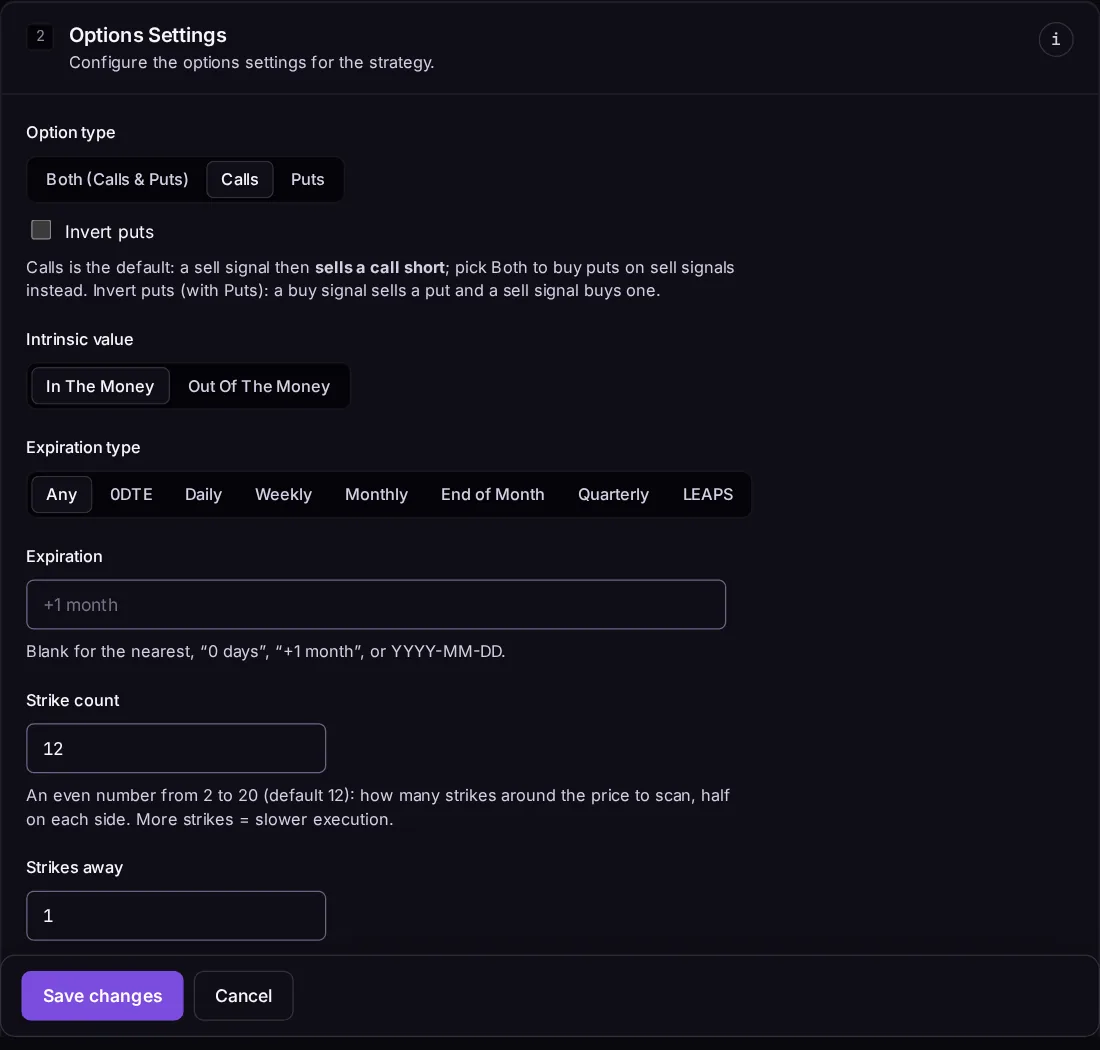
Send the underlying, and the subscription's Options contract settings choose the contract:
| Setting | What it does |
|---|---|
| Option type | Calls, puts, or both (calls when bullish, puts when bearish). |
| Intrinsic value | In the money or out of the money. |
| Expiration type | Any, 0DTE, daily, weekly, monthly, end of month, quarterly or LEAPS. |
| Expiration | The first expiration on or after this: a date (2026-11-20), a relative time (+1 month), or blank / 0 days for the nearest. |
| Strike count | How many strikes around the money to read (even, 2 to 20). |
| Strikes away | Which strike from the money to pick: 1 is the nearest. |
With Allow signal override on, the signal can set these itself:
{
    "ticker": "SPY",
    "action": "buy",
    "optionType": "call",
    "intrinsicValue": "itm",
    "expiration": "+2 weeks",
    "strikesAway": 2
}
Contract picking needs a broker that provides the option chain. See Broker Support.
Calls, puts and buy/sell
| Option type | buy |
sell |
|---|---|---|
| Calls (default) | Buy calls to open | Sell calls to open |
| Puts | Buy puts to open | Sell puts to open |
| Puts + Invert puts | Sell puts to open | Buy puts to open |
| Both | Buy calls | Buy puts |
Both lets you be bullish or bearish without ever selling options. Invert puts makes buy mean "bullish" for puts too, so a chart running on the underlying can trade puts directly. An open position on the other side is closed first, just like shares.
Quantity, prices and time in force
- Quantity is a number of contracts (1 contract = 100 shares). Dollar and percent sizing divide by the contract's cost (price × 100), rounded down to whole contracts.
- Options orders use DAY time in force.
- Take profit and stop loss for options are priced on the option's price, not the stock's.
↑ ↓ to move · Enter to open · Esc to close