
Fire Panel
Place trades from the dashboard on one or many accounts with a click, using the same order pipeline as your webhook signals.
On this page
What the Fire Panel is
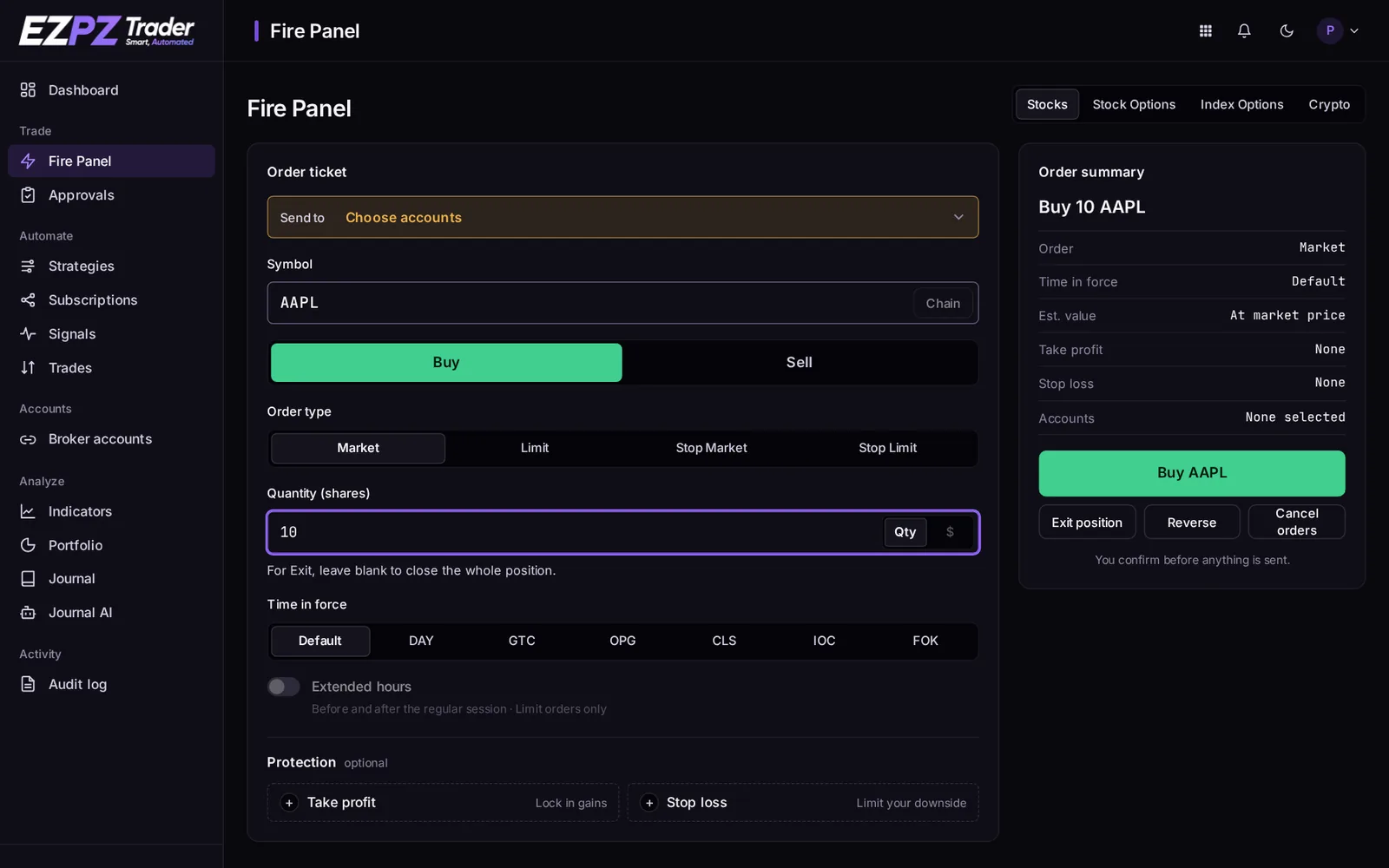
The Fire Panel is the dashboard's manual trading panel. Type a ticker, tick the accounts to trade, and click. Every click becomes a signal that runs through the same steps as an alert from TradingView, so sizing, take profit, stop loss and every check work the same way.
It's built into the dashboard, so there's no browser extension to install. It works on any device you're signed in on.
Accounts and asset types
The Fire Panel trades through links: one per account and asset type (Stocks, Stock Options, Index Options, Crypto, Futures). Each link is a normal subscription with its own settings. Use + Add link on the Fire Panel to create one.
A link only trades its own asset type. To trade options on an account that already has a Stocks link, add an Options link for it.
Buttons
| Button | What it does |
|---|---|
| Buy | Enter long, or add to a long when the link allows adding. |
| Sell | Enter short, or add to a short. |
| Exit | Close the position with a Market order. |
| Reverse | Close the position and open the same size on the other side. |
| Cancel | Cancel open orders on the ticker. |
Manual buy/sell against an open position
On the Fire Panel, a Buy while you're short (or a Sell while you're long) reduces the position by the quantity you typed. It doesn't close it and flip the way an alert would. Use Reverse to flip.
Order ticket
The order ticket lets you set this one order yourself: order type (Market, Limit, Stop Market, Stop Limit), limit/stop price, time in force and quantity. Every ticket order shows a preview of exactly what will be sent before you confirm.
Checks before sending
- Unknown tickers are refused before any order is made.
- Crypto pairs are checked with each account's broker.
- Options contracts are checked against the broker's listed contracts. Where the broker supports it, you can pick the contract from the option chain.
- Options orders are refused while the options market is closed. Webhook options signals queue for the open instead.
Where results appear
Each click creates a signal on the hidden manual strategy for that asset type. Open it from Signals or the Fire Panel's recent activity to see orders, fills and any skip reasons.
↑ ↓ to move · Enter to open · Esc to close