
Connecting Each Broker
Step-by-step connection details for every broker EZPZ Trader supports: how it connects, the paper and live options, and what you'll need.
On this page
Before you start
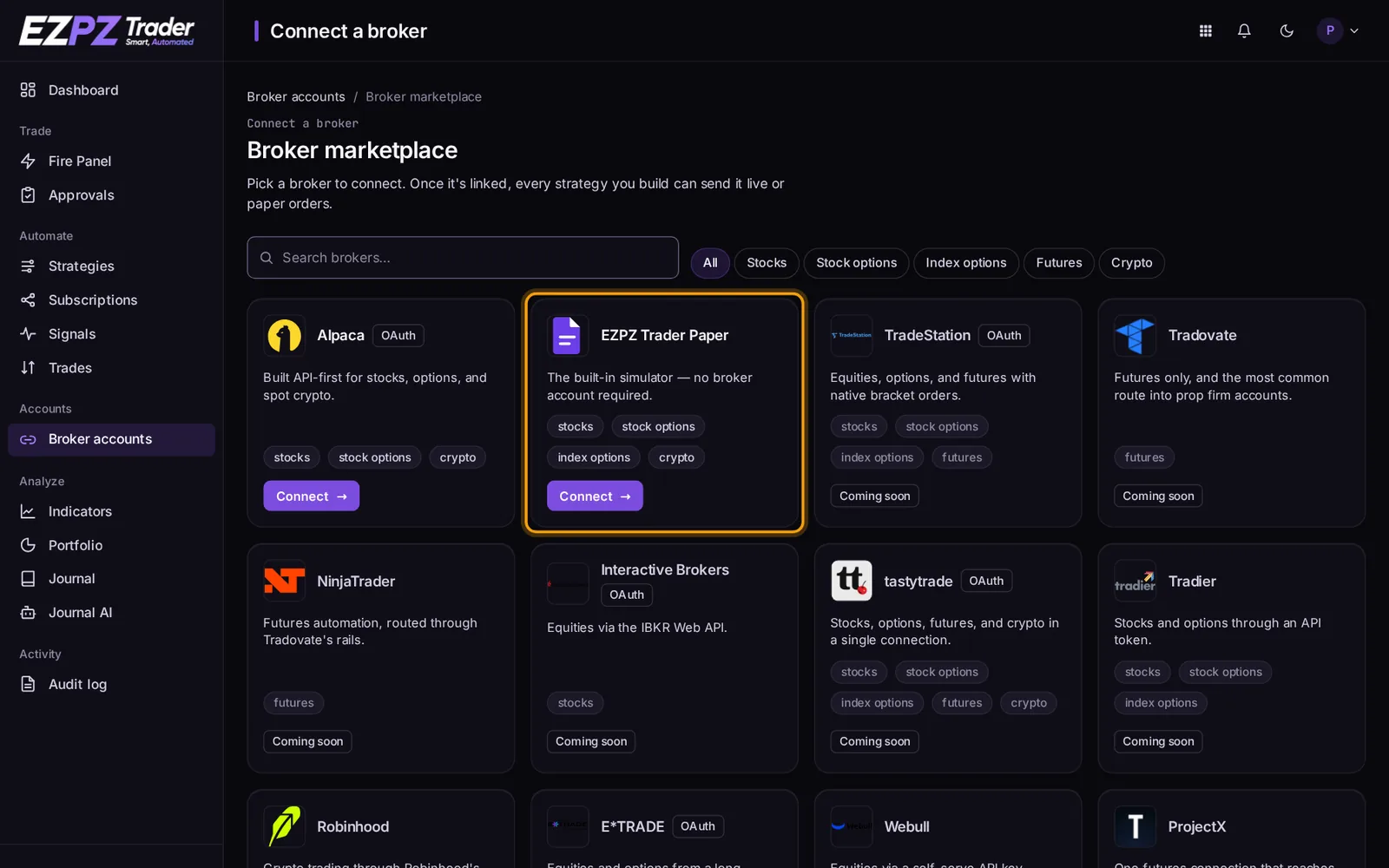
- Open Brokers in the dashboard and pick your broker.
- Choose Paper to test with simulated money, or Live for your real account, where the broker offers both.
- Follow the steps for your broker below. Keys you paste are stored encrypted and used only to place and manage your orders.
Keys with the least access
When a broker lets you choose permissions for an API key, allow trading and reading only. EZPZ Trader never needs withdrawal or transfer permission.
What each broker supports once connected (order types, take profit / stop loss, fractional, extended hours) is in Broker Support.
Alpaca
How it connects: OAuth sign-in. Open Alpaca's connect page from Brokers.
You can sign in with Alpaca (OAuth) and approve EZPZ Trader, or paste an API key below.
| Account | What it is | You'll need |
|---|---|---|
| Paper account | Practice with simulated fills, no real money. | API key ID, Secret key |
| Live account | Real money, real fills. Make sure paper testing went well first. | API key ID, Secret key |
TradeStation
How it connects: OAuth sign-in. Open TradeStation's connect page from Brokers.
TradeStation connects via OAuth. You'll sign in on TradeStation's own site, no API key to copy in. Their simulated (SIM) account needs a funded live account to already exist first.
| Account | What it is | You'll need |
|---|---|---|
| Paper account (SIM) | Practice with TradeStation's own real simulated fills. Requires an existing funded live account. | Sign in on the broker's site |
| Live account | Real money, real fills. Make sure paper testing went well first. | Sign in on the broker's site |
Good to know
Every so often an order gets rejected because TradeStation's tick-size data doesn't line up with the price you sent. If that happens, flag the ticker to TradeStation directly. Crypto isn't part of this integration yet.
Tradovate
How it connects: Username and password. Open Tradovate's connect page from Brokers.
No free tier: Tradovate requires a funded live account and an active $25/mo API Access add-on before you can even generate the API key below, and that's true for the demo/paper environment too, not just live. Generate your username/password and API key (cid) and secret (sec) from Tradovate's own dashboard first.
| Account | What it is | You'll need |
|---|---|---|
| Demo account | Tradovate's own simulated environment. Still requires the funded live account + API Access add-on above. | Username, Password, API key (cid), API secret (sec) |
| Live account | Real money, real fills. Make sure demo testing went well first. | Username, Password, API key (cid), API secret (sec) |
Good to know
No market-data add-on needed for the API. With two-factor authentication turned on, expect a 401 until you approve the connection from the email Tradovate sends. Check spam if it doesn't show up. The API doesn't expose open-position P&L, so always include a price on limit orders.
Interactive Brokers
How it connects: OAuth sign-in. Open Interactive Brokers's connect page from Brokers.
Interactive Brokers connects via OAuth: you'll sign in on IBKR's own site, no TWS or IB Gateway needed. Stocks only. Use a dedicated IBKR username with access to just the one account: IBKR allows one session per username, so logging in to TWS or the mobile app with it can make automated trades fail. IBKR LITE accounts can connect but IBKR refuses their API orders, so use IBKR PRO. In TWS, set Global Config → Presets → Stocks precaution fields to 0. Avoid sending signals during IBKR's nightly reset (about 23:45–01:00 ET). If a paper sign-in says the username isn't a paper account, reset your paper password in Client Portal → Settings → Paper Trading Account.
| Account | What it is | You'll need |
|---|---|---|
| Paper account | Practice with IBKR's own simulated account, no real money. Sign in with your IBKR paper username. | Sign in on the broker's site |
| Live account | Real money, real fills. Make sure paper testing went well first. | Sign in on the broker's site |
Good to know
IBKR only allows one API session per username, so it's worth creating a second username just for EZPZ Trader instead of reusing the one logged into TWS. Expect a daily maintenance window around 23:45-00:45 ET, orders processed one at a time rather than in parallel, and no API access at all on LITE accounts.
tastytrade
How it connects: API key. Open tastytrade's connect page from Brokers.
Connect with a Personal OAuth Grant, no redirect needed. Generate a client secret and refresh token at my.tastytrade.com → Manage → My Profile → API → OAuth Applications (create an application, then Manage → Create Grant on it) and paste both below.
| Account | What it is | You'll need |
|---|---|---|
| Test account | Not an ongoing paper account: tastytrade's certification environment resets every 24 hours and stays 15-minute delayed. Good for testing, not for tracking a strategy over time. | Client secret, Refresh token |
| Live account | Real money, real fills. Make sure test-account behavior looks right first. | Client secret, Refresh token |
Good to know
Connects via a Personal OAuth Grant generated on tastytrade's own site, no redirect needed. Notional (fractional-share) orders are supported. The certification sandbox resets every 24 hours, so it's a testing tool, not an ongoing paper account.
Tradier
How it connects: API key. Open Tradier's connect page from Brokers.
Tradier connects with a self-serve API token, not a redirect. Grab yours from Tradier's API Access page (paper accounts use a separate sandbox token) and paste it in below.
| Account | What it is | You'll need |
|---|---|---|
| Paper account | Practice with simulated fills on Tradier's sandbox. 15-minute delayed quotes, no real money. | Sandbox API token |
| Live account | Real money, real fills. Make sure paper testing went well first. | API access token |
Good to know
Grab the token from Tradier's API Access page and paste it in while adding the connection. Paper accounts are stuck on a 15-minute delayed feed. There's no way to change that.
Robinhood
How it connects: API key. Open Robinhood's connect page from Brokers.
Crypto only: Robinhood's only official trading API covers crypto, not stocks or IRA accounts. No paper trading available either. Generate an API key and private key from Robinhood's API Credentials Portal first.
| Account | What it is | You'll need |
|---|---|---|
| Live account | Real money, real fills. Robinhood has no paper/sandbox mode to test against first. | API key, Private key |
Good to know
Live only, no paper environment. Generate an API key and private key from Robinhood's API Credentials Portal, a separate step from your regular login. No bracket or attached stop/target orders exist in this API at all, so set risk limits directly on Robinhood's own app instead.
E*TRADE
How it connects: OAuth sign-in. Open E*TRADE's connect page from Brokers.
Reconnect daily: E*TRADE signs you out of every connected app at midnight Eastern time, every day, with no way around it. Use the Reconnect button on this connection's settings page each morning before it needs to trade again.
| Account | What it is | You'll need |
|---|---|---|
| Sandbox account | E*TRADE's own test environment. A real ongoing sandbox, not daily-reset, but not connected to real money or a real account either. | Sign in on the broker's site |
| Live account | Real money, real fills. Make sure sandbox testing went well first. | Sign in on the broker's site |
Second step: Paste your verification code. E*TRADE showed you a verification code on the page you were just sent to. Copy it and paste it below to finish connecting your paper or live account.
Good to know
E*TRADE signs every connected app out at midnight Eastern time, every single day, with no way to avoid it. Reconnecting is a one-click action, but it's a daily one. Not a great fit if you need this running unattended overnight.
Webull
How it connects: API key. Open Webull's connect page from Brokers.
Live accounts only, stocks only. Connect with an App Key and App Secret from Webull's API Management page (webull.com → My Account), not your regular login. If API Management is missing, ask Webull support to enable it. Leave the key's IP whitelist empty, or include our server. With 2FA on, Webull texts a code that must be confirmed in the Webull app within 5 minutes.
| Account | What it is | You'll need |
|---|---|---|
| Live account | Real money, real fills. Webull connects live accounts only. | App Key, App Secret |
| Webull sandbox (testing) | Webull's free sandbox with paper money. Use a sandbox App Key from Webull's Developer Tool → Paper Trading. Shown only while testing. | App Key, App Secret |
Second step: Confirm in the Webull app. Open the Webull app on your phone, go to Menu → Messages → OpenAPI Notifications, and confirm the code we just sent within 5 minutes. Then click below to finish connecting your paper or live account.
Good to know
No market data comes through Webull's API, so an independent quote feed is provided at no extra cost. Equities only. A connection goes stale after 15 days with no trading activity and needs the phone confirmation step repeated. Worth knowing if a strategy trades infrequently.
Coinbase
How it connects: API key. Open Coinbase's connect page from Brokers.
No paper trading available for Coinbase: Coinbase's sandbox only returns static canned responses, not live-priced fills, so every connection below trades with real funds immediately. Test your strategy on a paper-capable broker first if you haven't already.
| Account | What it is | You'll need |
|---|---|---|
| Live account | Real money, real fills. Coinbase has no paper/sandbox mode to test against first. | API key, API secret |
Good to know
Spot only, so no shorting and no margin. Watch for small leftover balances counting as an open position. They can block a new entry once you're at a position-count limit.
Kraken
How it connects: API key. Open Kraken's connect page from Brokers.
No paper trading available for Kraken: Kraken doesn't offer a sandbox environment, so every connection below trades with real funds immediately. Test your strategy on a paper-capable broker first if you haven't already.
| Account | What it is | You'll need |
|---|---|---|
| Live account | Real money, real fills. Kraken has no paper/sandbox mode to test against first. | API key, Private key |
Good to know
Set the custom nonce window to at least 20000ms when creating the API key. Leaving it at default leads to intermittent invalid-nonce rejections.
Binance.US
How it connects: API key. Open Binance.US's connect page from Brokers.
This connects to Binance.US, not global Binance: the compliant option for US-based accounts. No paper trading available.
| Account | What it is | You'll need |
|---|---|---|
| Live account | Real money, real fills. Binance.US has no paper/sandbox mode to test against first. | API key, API secret |
Good to know
Live only, no paper environment. Leave IP whitelisting off, since requests don't come from one fixed address. No bracket or OCO orders yet, so set risk limits directly in Binance.US's own app.
EZPZ Trader Paper
How it connects: Instant. Open EZPZ Trader Paper's connect page from Brokers.
| Account | What it is | You'll need |
|---|---|---|
| Paper account | No real broker account needed. This connects instantly. | Nothing: one click |
Good to know
Fills here are simulated and happen at once. Market orders fill at the live quote: the bid/ask midpoint unless you pick another Market Price Type; Limit orders fill at the price you set, without waiting for the market to reach it. Options are long only (buy to open, sell to close), cost price × 100 per contract, and expired contracts are settled after the close at their intrinsic value. Crypto trades USD, USDT and USDC pairs (e.g. BTC/USD), long only, around the clock, and fills at the last price from CoinMarketCap. Stop, Stop Limit and Trailing Stop orders and Take Profit / Stop Loss aren't supported, and stock and options orders follow market hours. Read the results as a check on your logic, not a preview of real performance.
Charles Schwab
How it connects: OAuth sign-in. Open Charles Schwab's connect page from Brokers.
No paper trading available for Schwab: Schwab doesn't offer a sandbox environment, so the connection below trades with real funds immediately. Reconnect every 7 days: Schwab hard-expires the connection on its end weekly, with no way around it; you'll need to run through this Connect flow again each time.
| Account | What it is | You'll need |
|---|---|---|
| Live account | Real money, real fills. Schwab has no paper/sandbox mode to test against first. | Sign in on the broker's site |
Good to know
Schwab's OAuth tokens must be manually reauthorized roughly every 7 days. There's no long-lived refresh yet. The API reaches live accounts only; its sandbox is synthetic test data, not a real paper account. Futures, forex and crypto aren't available through this connection.
Public.com
How it connects: API key. Open Public.com's connect page from Brokers.
A note on Public.com's own terms: the secret key you generate is issued under Public's Individual API Program, which is written for personal use on your own account. It doesn't contemplate connecting through a third-party tool like this one. Connecting here is outside the letter of that agreement. No paper trading and no short selling either. Cash accounts only.
| Account | What it is | You'll need |
|---|---|---|
| Live account | Real money, real fills. Public.com has no paper/sandbox mode to test against first. | Secret key |
Good to know
Create the key yourself from Account Settings → Security → API. There's no waiting period or application review like most other connections here. No short selling (cash accounts only) and no paper trading. Note: Public's own API terms are written for personal, single-user use. Connecting through EZPZ Trader falls outside them.
Lightspeed
How it connects: API key. Open Lightspeed's connect page from Brokers.
Connect with an API key from the Lightspeed Connect Platform (Developers → API Console), no redirect needed. Bracket/OCA orders aren't supported through this connection yet.
| Account | What it is | You'll need |
|---|---|---|
| Certification account | Lightspeed's full simulated trading environment. Real test fills, no real money. | API key, Account ID |
| Live account | Real money, real fills. Needs a production key from Lightspeed Support after certification testing. | API key, Account ID |
Good to know
Grab an API key from the Lightspeed Connect Platform's Developers section and paste it in: no OAuth, no redirect. Live trading needs a production key from Lightspeed Support after certification testing; the certification environment is a real, ongoing simulated account, not a daily reset. Bracket and OCA orders aren't available through this connection yet. Lightspeed's standard account minimums and market-data agreements still apply before you can trade.
Lime Brokerage
How it connects: Username and password. Open Lime Brokerage's connect page from Brokers.
Connect with your Lime username and password directly, no API key to generate first.
| Account | What it is | You'll need |
|---|---|---|
| Demo account | Lime's own 30-day trial demo. $100k simulated funds, not an ongoing paper account. | Username, Password |
| Live account | Real money, real fills. Make sure demo testing went well first. | Username, Password |
Good to know
We connect through Lime Trader's REST API. Lime Direct's FIX and colocation tier (aimed at high-frequency, exchange-colocated firms) isn't available through this integration. The demo option is Lime's own 30-day trial with $100k simulated funds, not an ongoing paper account.
AutoShares
How it connects: API key. Open AutoShares's connect page from Brokers.
Experimental connection: built from AutoShares' publicly documented conventions rather than a fully confirmed API reference. Test carefully with a small position before relying on it. Generate your Bearer Token and Account ID from AutoShares' own API Settings panel.
| Account | What it is | You'll need |
|---|---|---|
| Live account | Real money, real fills. | Bearer Token, Account ID |
Good to know
This connection is newer and less battle-tested than our other broker integrations. Test carefully with a small position before relying on it for unattended automation, and reach out if anything looks off.
↑ ↓ to move · Enter to open · Esc to close