
Stop loss and take profit on an automated signal: every way to send them
A stop loss and a take profit can ride along with an entry. You can express them as a percent, a price distance, an exact price or a dollar P&L for the whole position, and each one becomes a real price at your broker. Here is how each unit works, using one real entry from our demo account.
The example entry
Every price below comes from one real entry on the EZPZ Trader demo account, on paper, on Oct 22, 2026: the SPY Opening Range strategy bought 10 shares of SPY at $766.65 at 9:32:43 a.m. ET.
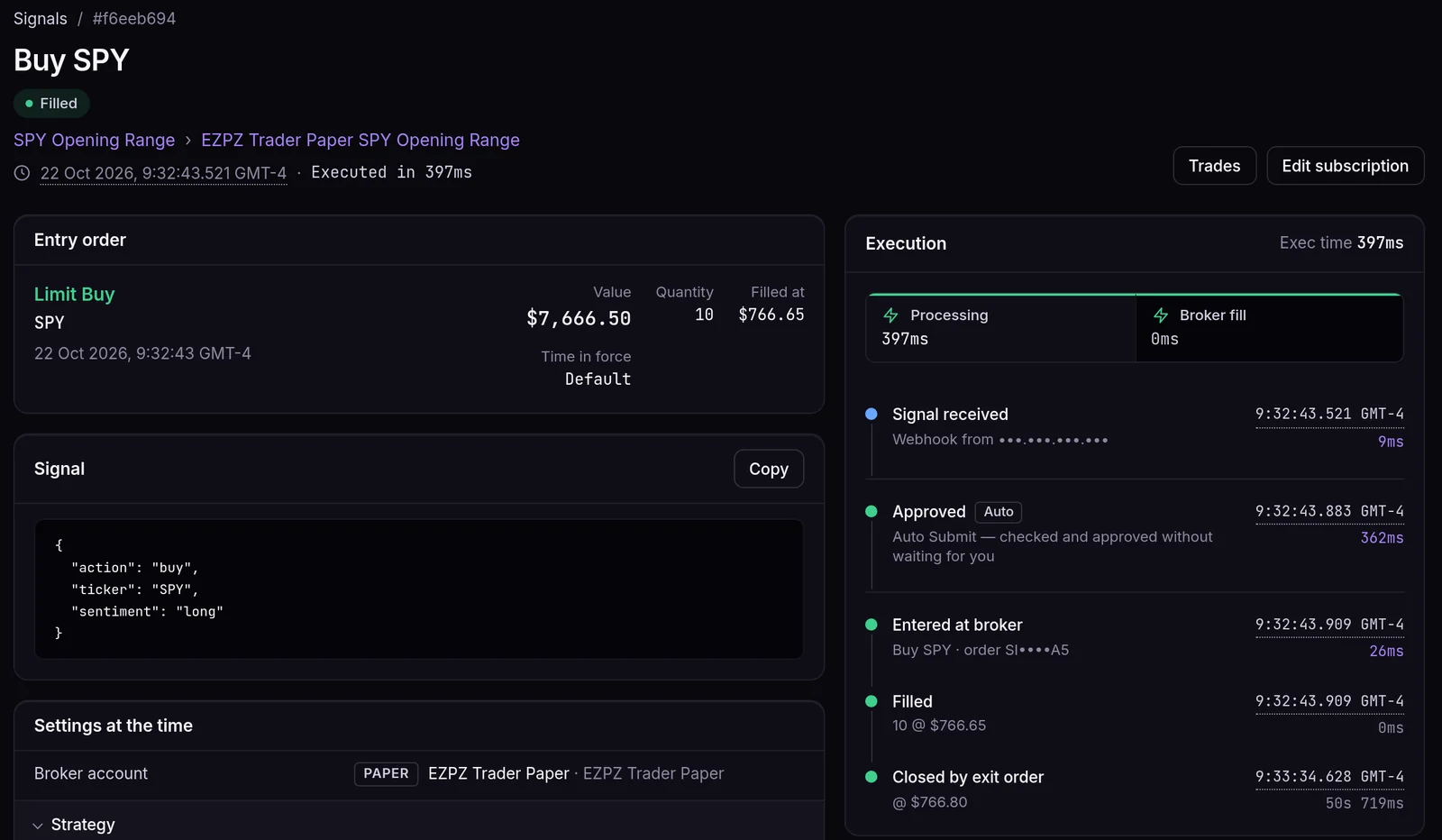
The paper account doesn't hold attached exits (more on that below), so this entry had no stop or target. The prices in the table are the levels each unit would give for this entry, worked out the way the order code does it.
The four units
| Unit | Field | Example | Price it gives on the $766.65 entry |
|---|---|---|---|
| Percent from entry | percent |
take profit 1 | $766.65 + 1% ($7.6665) = $774.3165 → $774.32 |
| Price distance | amount |
stop loss 5 | $766.65 − $5.00 = $761.65 |
| Exact price | limitPrice / stopPrice |
stop 760 | $760.00 |
| Position P&L | pnlAmount |
stop loss 80 | $80 ÷ 10 shares = $8.00 away → $758.65 |
A few rules apply to all of them:
- Send one unit per leg.
{"percent": 2, "amount": 1}is refused because it's ambiguous. - For a short position the directions flip: the target is below the entry and the stop is above it.
- Prices are rounded to a price the market accepts, one cent for stocks at $1 or more. Both exits of a long are sell orders, which round up: that's why $774.3165 becomes $774.32. A short's exits are buy orders and round down.
Sending them in the signal
{
  "ticker": "SPY",
  "action": "buy",
  "price": 766.65,
  "takeProfit": {"percent": 1},
  "stopLoss": {"type": "stop", "amount": 5}
}
The stop loss has a type:
stopis a stop market order. It's the most likely to get you out, but the fill can be worse than the stop price in a fast market.stop_limitadds alimitPrice, so it never fills worse than that price. In a gap it may not fill at all.
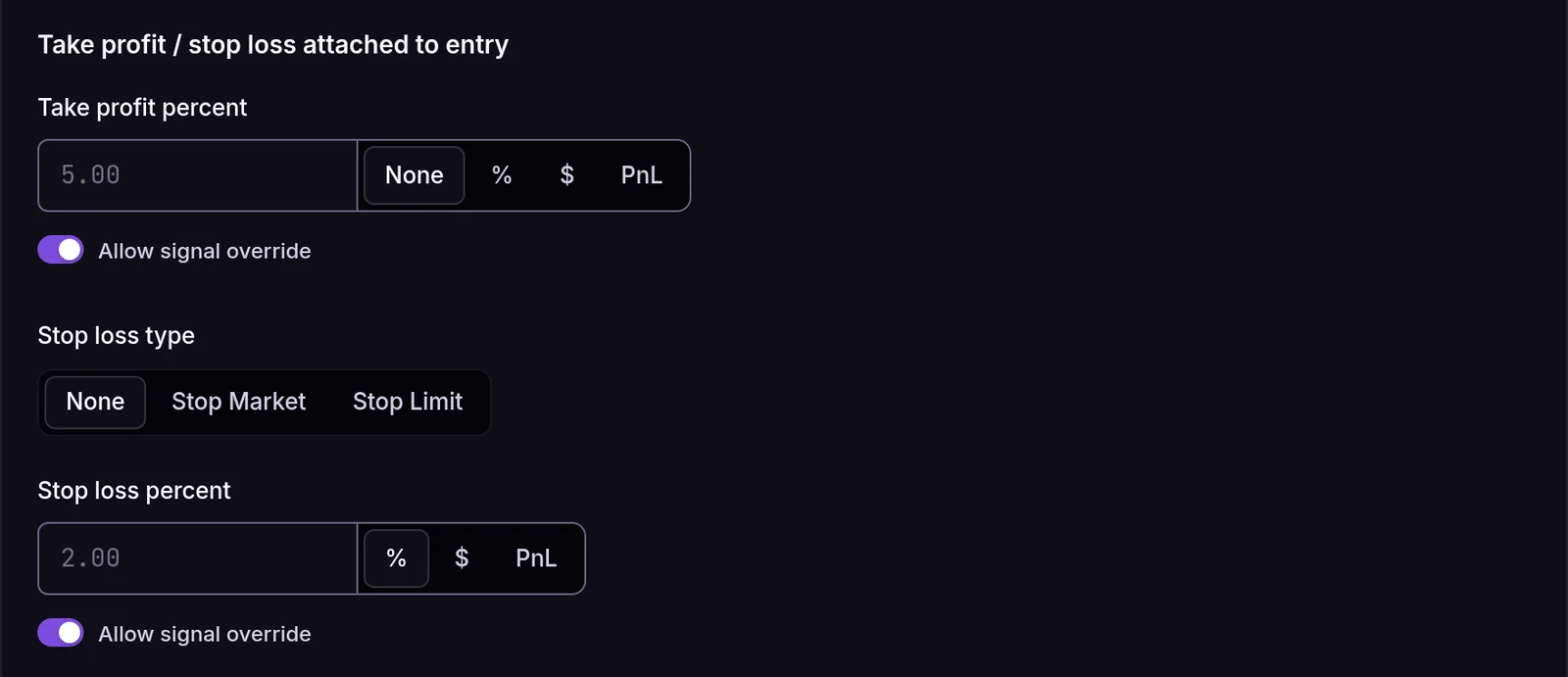
The signal's values only count when the subscription allows the override. Each one has its own Allow signal override switch in the subscription's Entry section, on by default.
Where the orders live
On brokers that support attached orders, the entry and its exits go out together as one order. When one exit fills, the broker cancels the other. Ten of the brokers we connect to work this way: Alpaca, Charles Schwab, Coinbase, Interactive Brokers, Kraken, tastytrade, TradeStation, Tradier, Tradovate and Webull. Not all of them take both legs: Kraken takes one exit (a stop or a target) and Coinbase takes only both together.
That has two consequences worth knowing:
- The broker holds your protection. Even if TradingView stops sending alerts, the stop is already resting at your broker.
- We find out about exits by asking the broker. We check open orders every couple of minutes and record the exit in your Journal when it fills.
What the paper account does with them
The built-in EZPZ Trader Paper account fills an order at once and nothing watches the price afterwards, so a stop or target could never close the trade. The Entry section still shows the take profit and stop loss settings on a paper subscription, but it won't save a value. A signal that sends them is skipped, so you never get an entry you thought was protected.
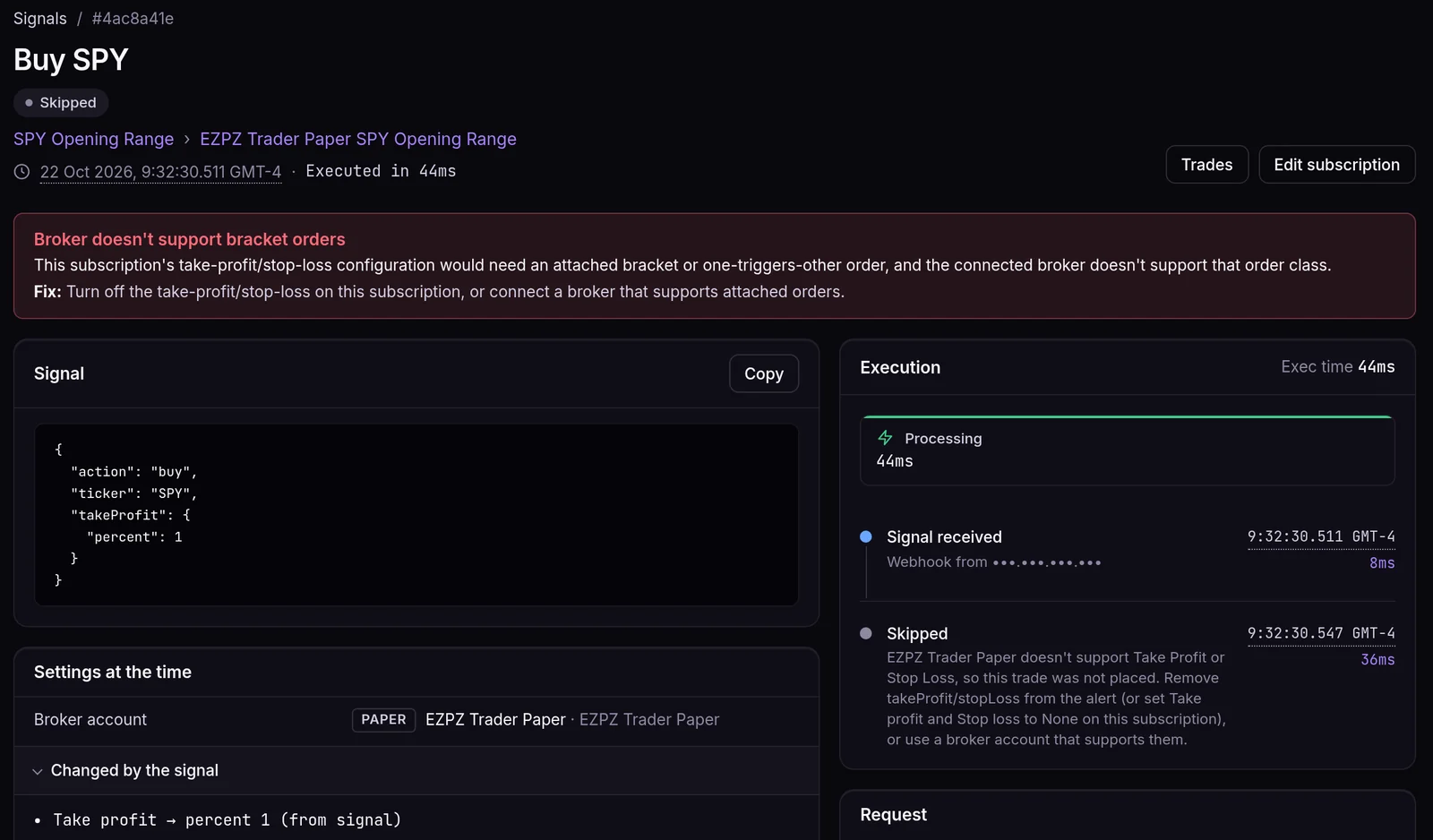
We tested this on the same demo account. Thirteen seconds before the entry above, we sent a buy with "takeProfit": {"percent": 1}. It was skipped 36 ms after it arrived, with the reason Broker doesn't support bracket orders, and nothing was sent.
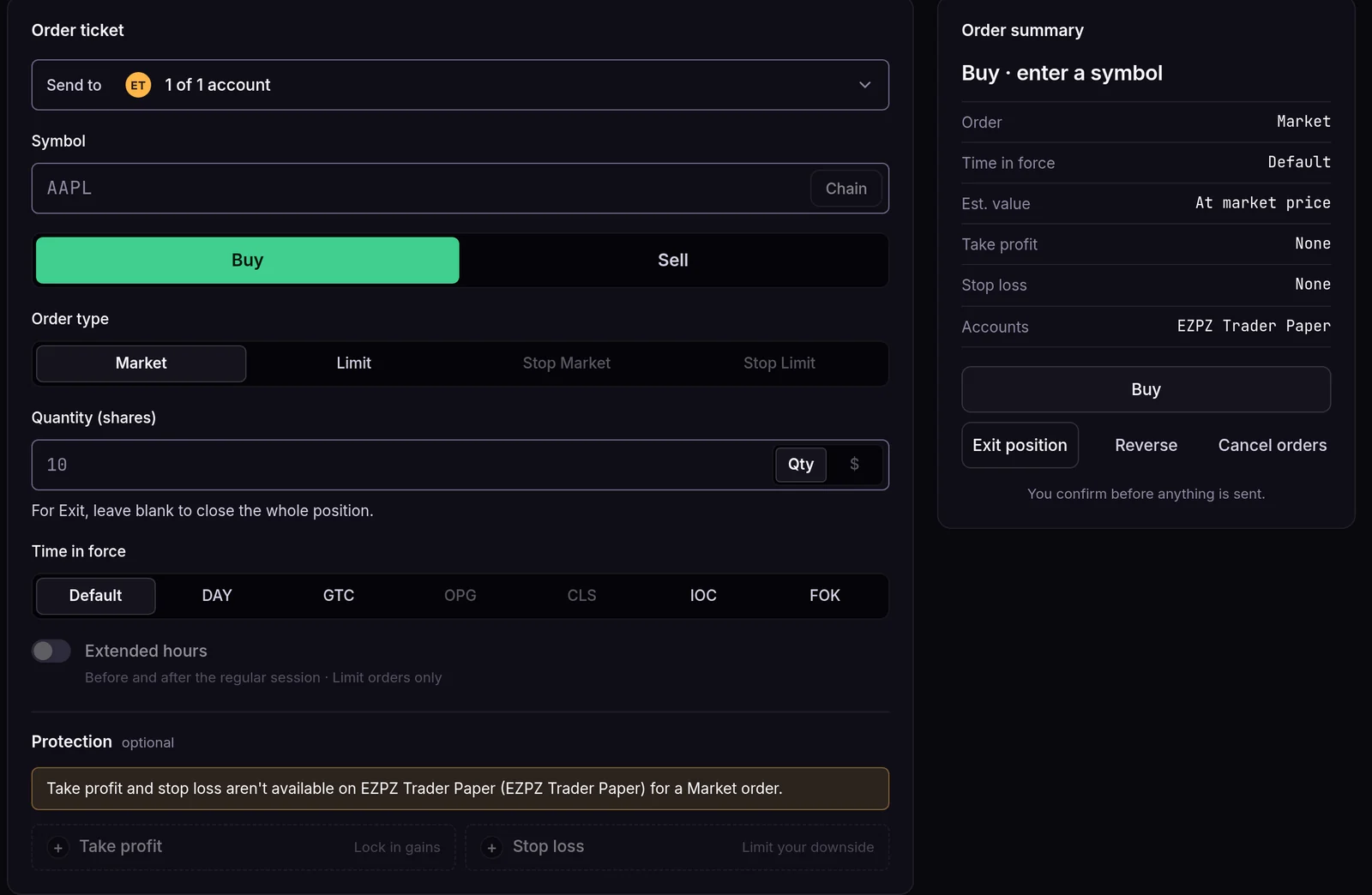
Fire Panel says the same before you send anything: with the paper account selected, the Protection area reads Take profit and stop loss aren't available on EZPZ Trader Paper.
To practise with attached exits, connect a broker's own paper account, for example Alpaca paper.
Options are different
Only four brokers take a stop or target attached to an options entry: Tradier, tastytrade, TradeStation and Charles Schwab. On other brokers, set them to None and manage options exits with your own exit signals. When the contract is picked for you from a plain ticker like SPY, send percent, amount or pnlAmount. An exact price would be a SPY level, not an option premium, so it's refused.
Moving the stop to breakeven
Send "action": "breakeven" with "orderType": "stop" (or stop_limit) to place a stop exit for the whole position at your average entry price, plus or minus the subscription's breakeven offset if you set one. A breakeven only works once price has moved past the new stop. Otherwise the stop would fill immediately, so the signal is skipped with Price not past the breakeven stop yet.
Reward to risk, quickly
With the example target at $774.32 and stop at $761.65, you risk $5.00 a share to make $7.67, a reward-to-risk ratio of 1.53. On 10 shares that's $50.00 at risk for $76.70. At that ratio, you break even over time by winning about 39% of trades (5.00 ÷ 12.67). The Trade Journal guide shows how to check that against your real results.
1.53
reward to risk: $7.67 target vs $5.00 stop on the $766.65 SPY entry
39%
win rate needed to break even at that ratio, before costs
Frequently asked questions
Should I set the stop on the subscription or in the signal?
Use the subscription when the rule is the same for every trade, for example "always 2% stop". Use the signal when your script calculates a level per trade, such as below the last swing low. The signal only wins when the subscription allows the override.
What happens if the stop and target are on the wrong side of the entry?
The trade is skipped with the reason instead of being sent, because a target below a long entry would fill the moment it opened. With percent, amount and pnlAmount this can't happen: send positive numbers and the side decides the direction. It can only happen with exact prices.
Can I change a stop that's already at the broker?
Send a breakeven signal to move it to entry. For any other level, close the position with an exit signal and re-enter, or adjust the order at your broker.
Why was my paper entry skipped when I added a take profit?
The EZPZ Trader Paper account can't hold a stop or target, so it skips the entry instead of placing it unprotected. Remove takeProfit and stopLoss from the alert, or use a broker account that supports them.
Does a stop loss guarantee my exit price?
No. A stop market order fills at the next available price, which can be worse in a gap. A stop limit order caps the price but may not fill at all.