
What paper trading proves, what it hides, and how our paper account fills orders
Paper trading is honest about your setup and generous about your fills. It catches nearly every configuration mistake within a few signals. But simulated fills skip the spread, slippage and liquidity, so paper results almost always look better than live ones. Here are the exact rules our paper account fills by, shown on real trades, so you know which is which.
All numbers and screens below come from the EZPZ Trader demo account, trading on the paper account on Thursday, Oct 22, 2026. Its signals were sent to its strategies' real webhook URLs and filled at live prices.
How the EZPZ Trader Paper account fills orders
| Order | On EZPZ Trader Paper |
|---|---|
| Market | Fills at once, at the live price (see below) |
| Limit | Fills at once, at your limit price |
| Stop Market / Stop Limit / Trailing Stop | Not allowed, refused with a clear message |
| Attached take profit / stop loss | Not allowed, the trade is skipped with a clear message |
| Stock or options signal while the market is closed | Queued, then filled at the open like any other account |
It trades stocks, stock and index options (long only, settled at their intrinsic value after the close on expiration day) and crypto against USD, USDT and USDC (long only).
Where a Market fill price comes from. For stocks and options, the paper account reads a live Intrinio quote and fills at the subscription's Market Price Type: the bid/ask midpoint by default, or the last trade when there's no bid and ask. For crypto, CoinMarketCap gives a last price only, with no bid or ask, so every Market Price Type fills at that last price. CoinMarketCap updates it roughly once a minute, and a crypto price more than 3 minutes old counts as no price: the order is skipped rather than filled at a stale number. When a live price is there, it wins over a price sent in the alert.
What it looked like on the demo account
The demo account started with $100,000 of paper cash. By 9:36 a.m. ET it had closed 37 round trips (19 crypto, 18 stock), held nothing, and showed $100,010.91: $10.91 above where it started.
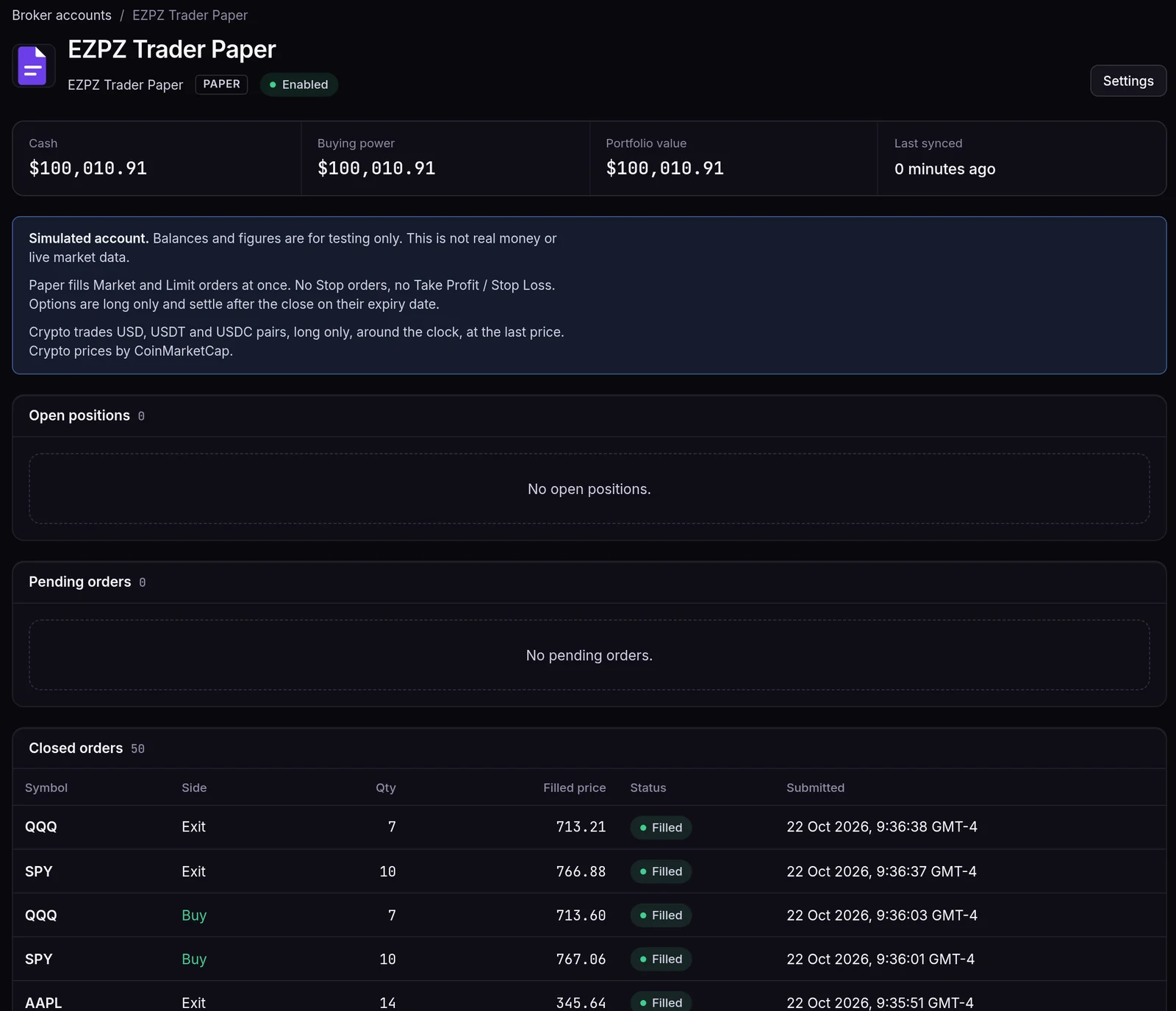
A few things on that page are worth reading closely:
- Every order filled as soon as it was sent. There are no pending orders, because paper never leaves a Market or Limit order resting.
- Sizes follow the subscription, in shares. "SPY Opening Range" trades a fixed 10 shares: its first buy filled at $765.95 at 9:30:18 a.m. ET and exited at $766.41 at 9:30:49, a $4.60 gain. "QQQ Trend Follow" buys $5,000 worth: 7 shares at $712.86, but only 6 at $714.37, because 7 would have cost more than $5,000.
- Stocks waited for the open. "AAPL Momentum" received its buy at 8:49:11 a.m. ET, before the market opened. It was queued, then filled at 9:30:17 a.m.: 14 shares at $345.71, its 5% of equity. The crypto orders around it filled straight away.
A crypto round trip, with the real numbers
The "BTC Swing" strategy buys $2,000 of each coin with fractional quantities on. One full round trip, bought at 9:16 a.m. ET and sold at 9:18 a.m. ET:
| Pair | Quantity | Bought at | Sold at | P&L |
|---|---|---|---|---|
| BTC/USD | 0.024532 | $81,523.61 | $81,652.13 | +$3.15 |
| ETH/USD | 0.833823 | $2,398.59 | $2,398.15 | −$0.36 |
| SOL/USD | 19.205674 | $104.14 | $104.19 | +$1.06 |
That's +$3.85 on $6,000 in about 80 seconds, with no spread and no fees taken out. On a live exchange you'd buy at the ask, sell at the bid and pay a fee each way, which on a move this small could easily turn the round trip into a loss.
The once-a-minute price shows up in the data too. An ETH/USD position opened at 9:20:59 a.m. ET and closed at 9:22:06 a.m. ET at the same $2,397.00, because CoinMarketCap's ETH price hadn't changed in between. Its P&L was exactly $0.00.
Crypto is long only
At 9:24:51 a.m. ET, with no BTC held, the strategy received a sell with "sentiment": "short". On a stock subscription that allows shorts it would open a short. On crypto it was skipped, and nothing was sent:
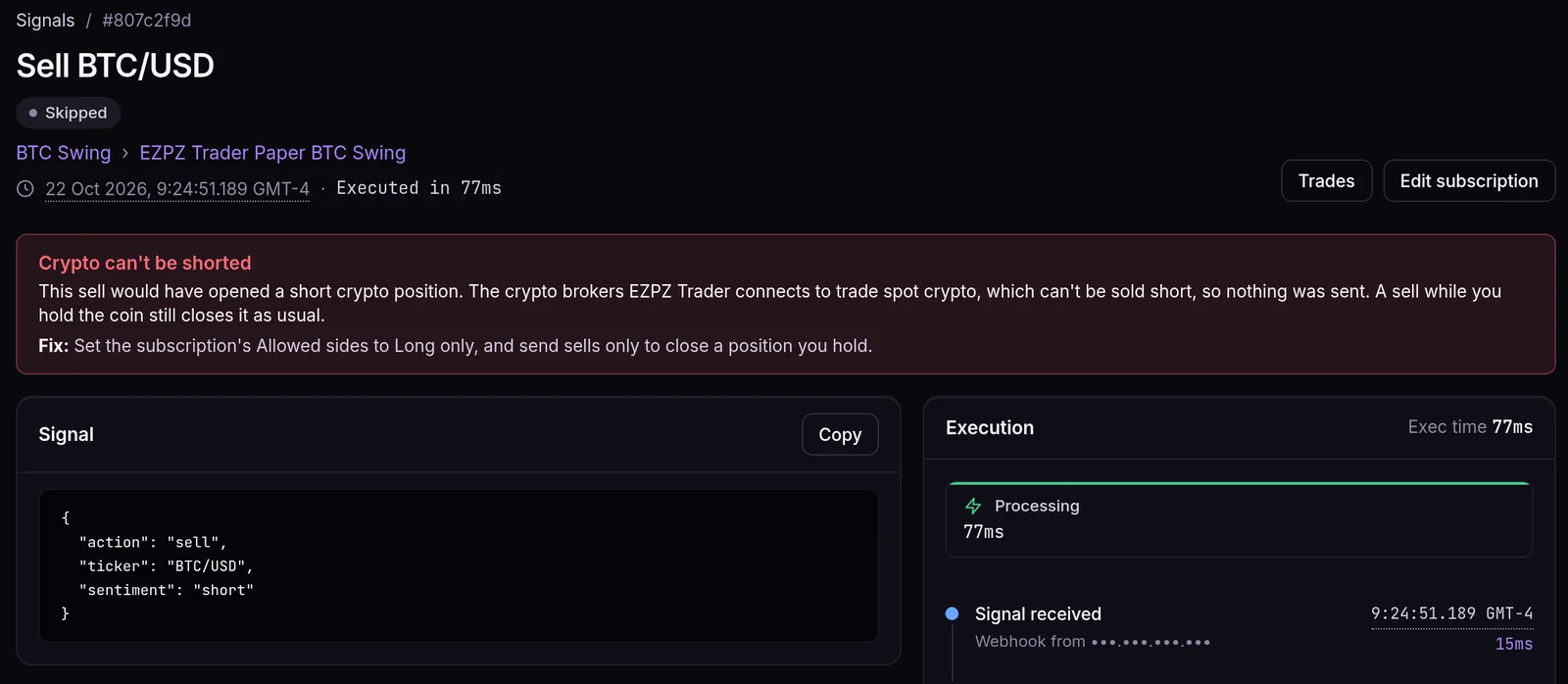
A sell while you hold the coin still closes it as usual. Only a sell that would open a short is refused.
No take profit or stop loss on paper
Paper fills at once and nothing watches the price afterwards, so it can't hold a take profit or stop loss. The Fire Panel says so as soon as the paper account is picked, and greys out the stop order types:
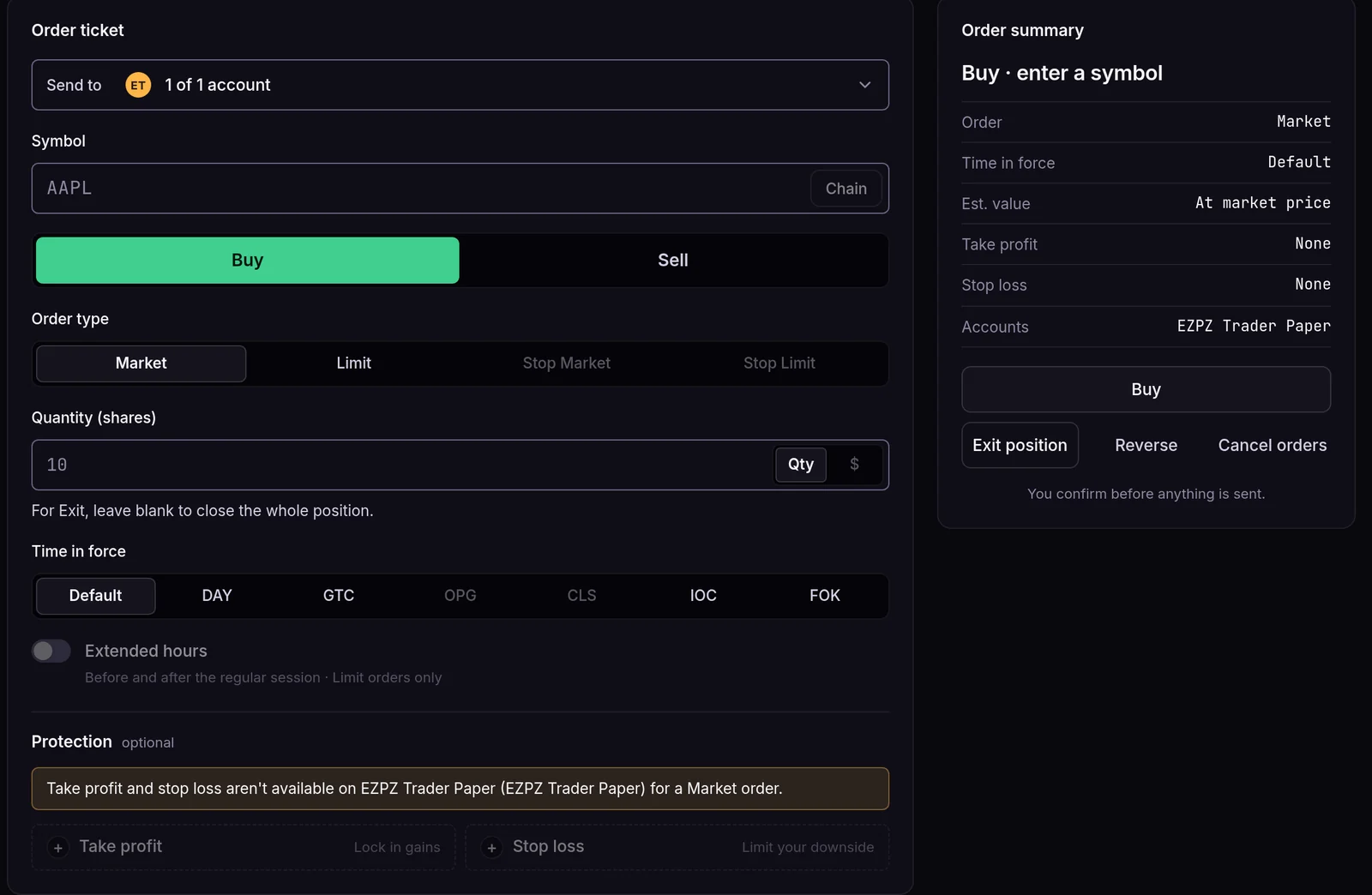
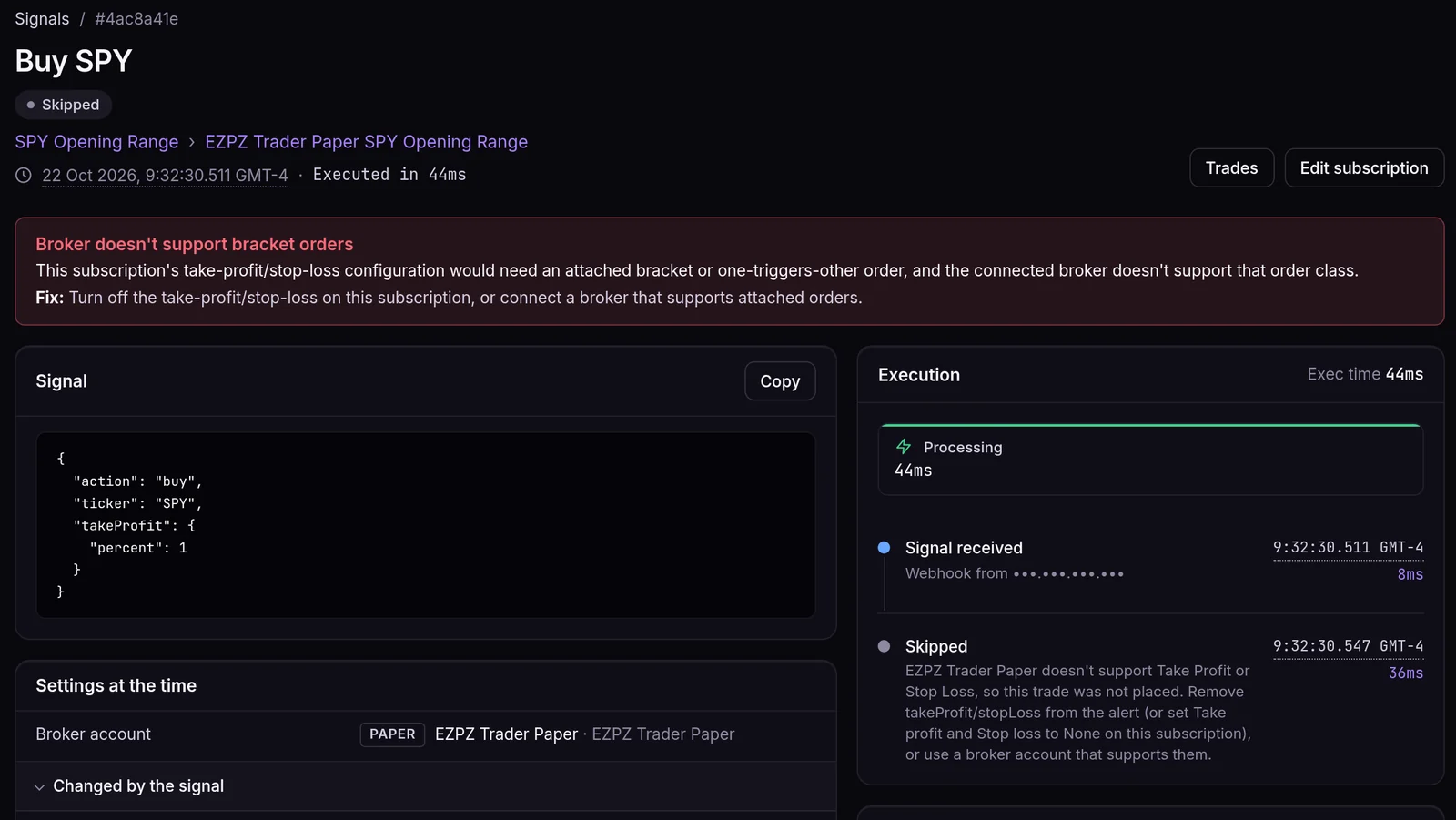
A webhook alert that carries takeProfit or stopLoss to a paper subscription is skipped whole rather than filled without protection, because an unprotected position is worse than no position. At 9:32:30 a.m. ET the demo account sent "SPY Opening Range" a buy with "takeProfit": {"percent": 1}, and this is what happened:
What paper is excellent at catching
These are setup and logic errors. A simulated fill shows them exactly as well as a real one, usually within the first few signals:
- a ticker format the account doesn't accept (crypto pairs and options contracts especially)
- a sizing method that produces 400 shares when you meant 40
- signals reaching a subscription with the wrong sides, window or asset class
- exits that don't match entries, such as an
exitwith nothing open, or asellthat would open a short you didn't intend - a TradingView placeholder that sends an empty price
What paper can't show you
- Spread and slippage. A live market order buys at the ask and sells at the bid, and in a fast market even worse.
- Partial fills. Live orders on thin symbols can fill in pieces.
- Rejections. Margin checks, short locates, trading halts and broker-specific rules only show up live.
- Your own reactions. Watching real money move changes how people manage positions.
Paper on your broker vs ours
Some brokers, Alpaca for example, have their own paper accounts. Those run your order through the broker's simulator, with real order types and brackets, so they're a closer rehearsal of live behaviour. They come with the simulator's own quirks, such as fills that can take a while to arrive. Our paper account is the fastest way to check the logic. A broker paper account is the closest you can get to live without risking money.
A checklist before you go live
Run at least one full cycle on paper
An entry, an exit and, if your strategy does it, a reversal. Check each one on the Signals page.
Check sizes in dollars, not just shares
Open each order and make sure the dollar amount is what you'd be comfortable with live.
Read every skipped signal
A skip on paper will usually skip on live too. Make sure each one was intended.
Start live small and on Manual Submit
Subscribe the live account to the same strategy, at a fraction of your target size, and approve the first few orders by hand.
Compare the first live fills with paper
The gap between them is your real cost of trading. Plan around it.
Frequently asked questions
Does paper start the free trial clock?
No. The 7-day trial starts with your first order on a connected third-party broker. Orders on the built-in paper account don't count, but a broker's own paper account does.
Can I short on the paper account?
Stocks, yes. Options on paper are long only, so you can buy calls and puts and sell them back. Crypto is long only everywhere.
Why was my paper order refused?
Most often it was a stop order type or a take profit or stop loss, which paper doesn't support. For a Market order it can also be a missing live price. The signal shows the exact reason.
How fresh are paper crypto prices?
They come from CoinMarketCap, which updates roughly once a minute. A price older than 3 minutes isn't used, and the order is skipped instead.
Are paper trades in my Journal?
Yes. Every paper fill is recorded in the Journal as it happens, so you can review a paper run with the same tools as a live one.