
Trading options from a TradingView alert: contract symbols, auto-picked strikes and the rules that change
There are two ways to trade options from an alert. You can send the exact contract, or you can send the stock's ticker and let the subscription choose the contract. Either way, a few order rules change compared with stocks. This guide covers both ways and every rule that differs.
Way 1: send the exact contract
If your alert runs on an option's own chart, TradingView fills in {{ticker}} with the contract. We accept the common formats and convert them all to the standard OCC symbol:
| Written as | Example | Notes |
|---|---|---|
| OCC (standard) | AAPL261016C00230000 |
strike × 1000, 8 digits |
| TradingView | AAPL261016C230.0 |
trailing .0 optional |
| With a space | AAPL 261016C230 |
Each format reads as underlying, expiration (YYMMDD), C or P, and strike. A badly formed contract is refused at the webhook with:
Invalid Options ticker symbol format. The correct format is: [UNDERLYING] [YYMMDD][C|P][STRIKE]. Example: SPY 241004C571
If you also send optionType, it must match the C or P in the symbol. A mismatch is refused rather than letting one of them win.
Way 2: send the ticker and let the subscription pick
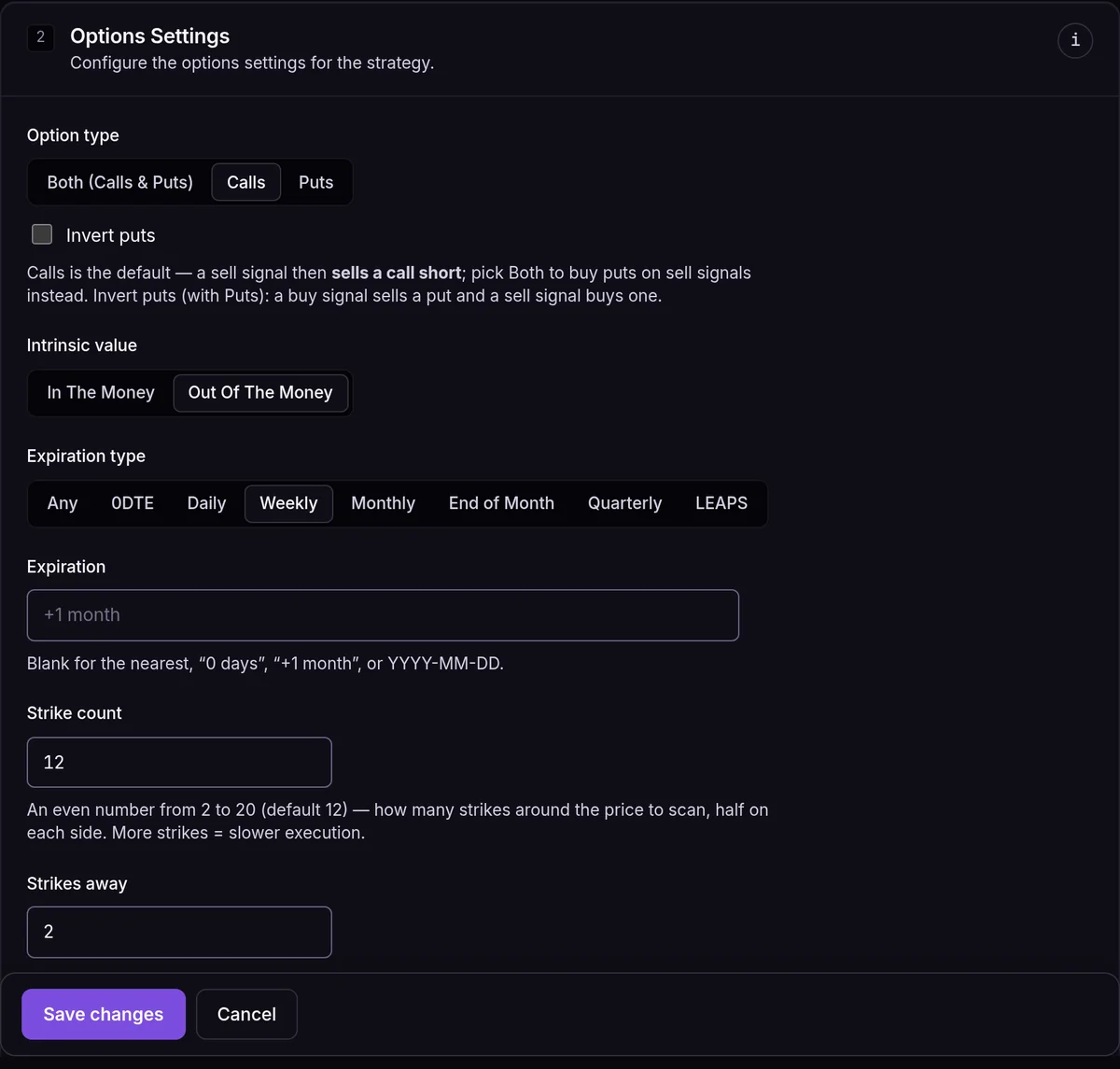
Send the underlying instead, and the subscription's Options Settings choose the contract at the moment the signal arrives. This is the section on our demo account's "SPY Weekly Calls" subscription:
Call or put
Option type is Both, Calls or Puts. Calls is the default, and then a
sellsignal sells a call. With Both,buybuys a call andsellbuys a put.Expiration
Expiration type (any, 0DTE, daily, weekly, monthly, end of month, quarterly or LEAPS) plus an optional target such as
+7 days. We take the first expiration on or after the target.Strike
We find the at-the-money strike, the one nearest the stock's current price, and keep Strike count strikes around it (an even number from 2 to 20, 12 by default). We then apply In the money or Out of the money and take the strike Strikes away from the money. With the settings above, that's the second out-of-the-money weekly call.
Send
The result is an ordinary contract symbol, and the rest of the order works exactly as if you had sent that contract yourself.
{"ticker": "SPY", "action": "buy", "optionType": "call", "expirationType": "weekly", "intrinsicValue": "otm", "strikesAway": 2}
When the subscription allows contract overrides (the default), fields like these in the signal replace the subscription's settings for that one trade.
The rules that only apply to options
| Rule | Why |
|---|---|
| Day orders only | Listed US options trade in the regular session, and brokers reject other time-in-force values. |
| No extended hours | Options don't trade before or after the session, so the setting is hidden. |
| Attached stop loss / take profit on some brokers only | Tradier, tastytrade, TradeStation and Charles Schwab accept them on options entries. Alpaca and the paper account don't, so send exit signals there. |
| Whole contracts | Quantities round down. A size that rounds to 0 contracts is skipped. |
| ×100 in dollar sizing | $2,000 into a $2.50 contract is 2,000 ÷ 250 = 8 contracts. |
| Limit price without a signal price | We use the midpoint of the contract's bid and ask. |
| Prices rounded to the options tick | $0.01 below $3, $0.05 at $3 and above, for most contracts. |
100
shares per standard contract
9:30-4:00
ET session for stock options; index options such as SPX run to 4:15
4
brokers that accept attached exits on options: Tradier, tastytrade, TradeStation, Charles Schwab
When the market is closed
An options signal that arrives on the webhook outside the session is queued and sent at the next open. The Fire Panel works differently: a manual options order is refused while the market is closed, so you never leave a hand-placed order waiting overnight. See how the market-hours queue works.
Options on paper
The built-in EZPZ Trader Paper account trades stock and index options long only: you can buy calls and puts and sell them back. Contracts that expire are settled after the close. It's a good place to check that your symbols, strikes and sizes come out the way you expect before any real premium is at stake.
Frequently asked questions
Can I sell (write) options?
On a live broker, yes, if your account is approved for it. With Option type set to Calls, a sell signal sells a call. With Puts, it sells a put, and Invert puts flips that so a buy signal sells the put instead. The paper account is long only.
My alert sent `AAPL` and nothing traded. Why?
Check the subscription's asset class. A stock ticker on an Options subscription needs Options Settings to pick a contract (on a broker with an option chain), and a contract on a Stocks subscription is skipped with Wrong asset type for this subscription.
What if no contract matches my settings?
The signal is skipped with the reason. We never fall back to a different expiration or strike than the one you asked for.
Do 0DTE contracts work?
Yes, with the 0DTE expiration type. On expiration day, PM-settled index contracts stop trading at 4:00 ET like stocks, not at 4:15.