
Nine webhook mistakes that look like bugs, and the log line that gives each one away
When an alert doesn't produce the trade you expected, the cause is almost always on a short list, and the Signals page names it. Every signal is logged with what arrived, what was decided and why, even when nothing was traded. Here are the nine causes we see most.
To show what each one looks like, we made these mistakes on purpose on the EZPZ Trader demo account, trading on paper on Oct 22, 2026. The screenshots are those real signals. Where we didn't reproduce a mistake, we quote the message the app shows for it instead.
Refused at the door
These four are checked before any subscription sees the signal. The webhook answers with an error (HTTP 400, or 404 for an unknown webhook), and nothing is traded.
1. The JSON isn't valid
You'll see: Malformed payload, "Body isn't valid JSON."
At 9:31:04 a.m. ET we sent {"ticker": "SPY", "action": "buy",} to the SPY Opening Range strategy. One trailing comma after the last field is enough. Other usual causes are curly quotes pasted in from a notes app (“ticker” instead of "ticker"), or a TradingView placeholder that came out empty and left "price": ,.
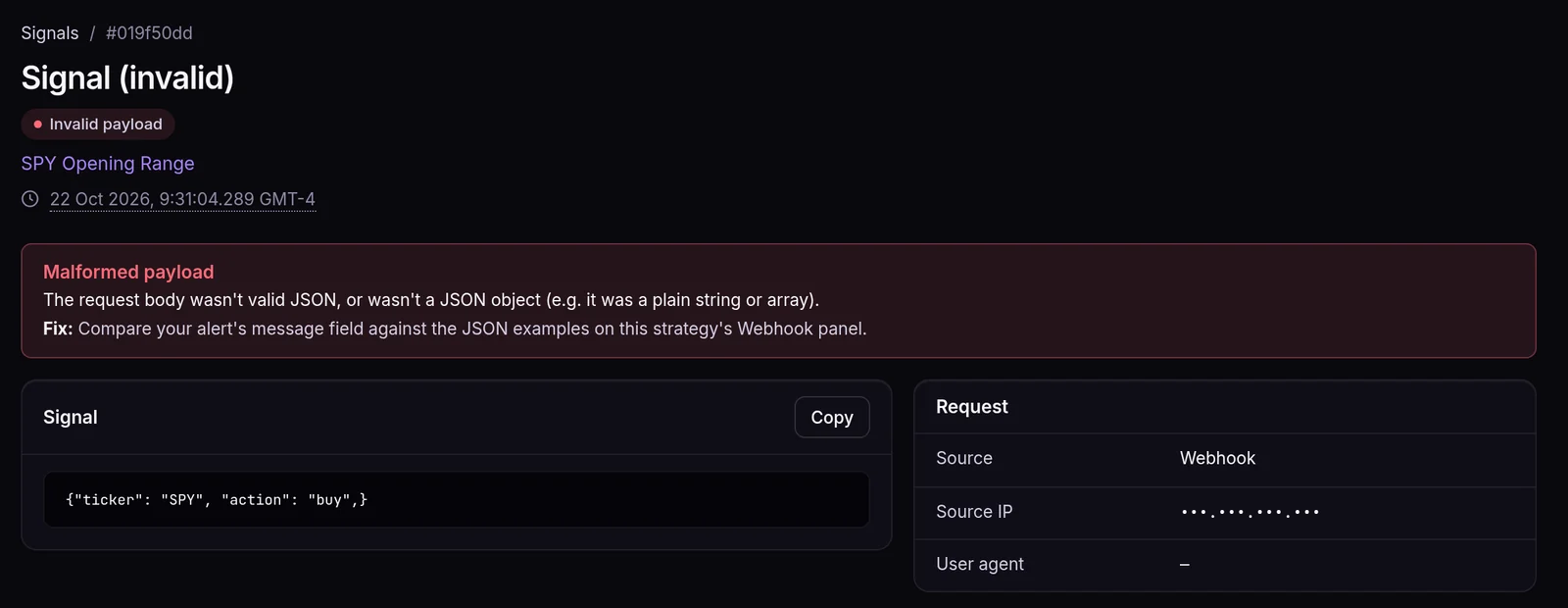
Fix: paste the message into any JSON validator. Type the quotes in a plain-text editor.
2. The action isn't one we know
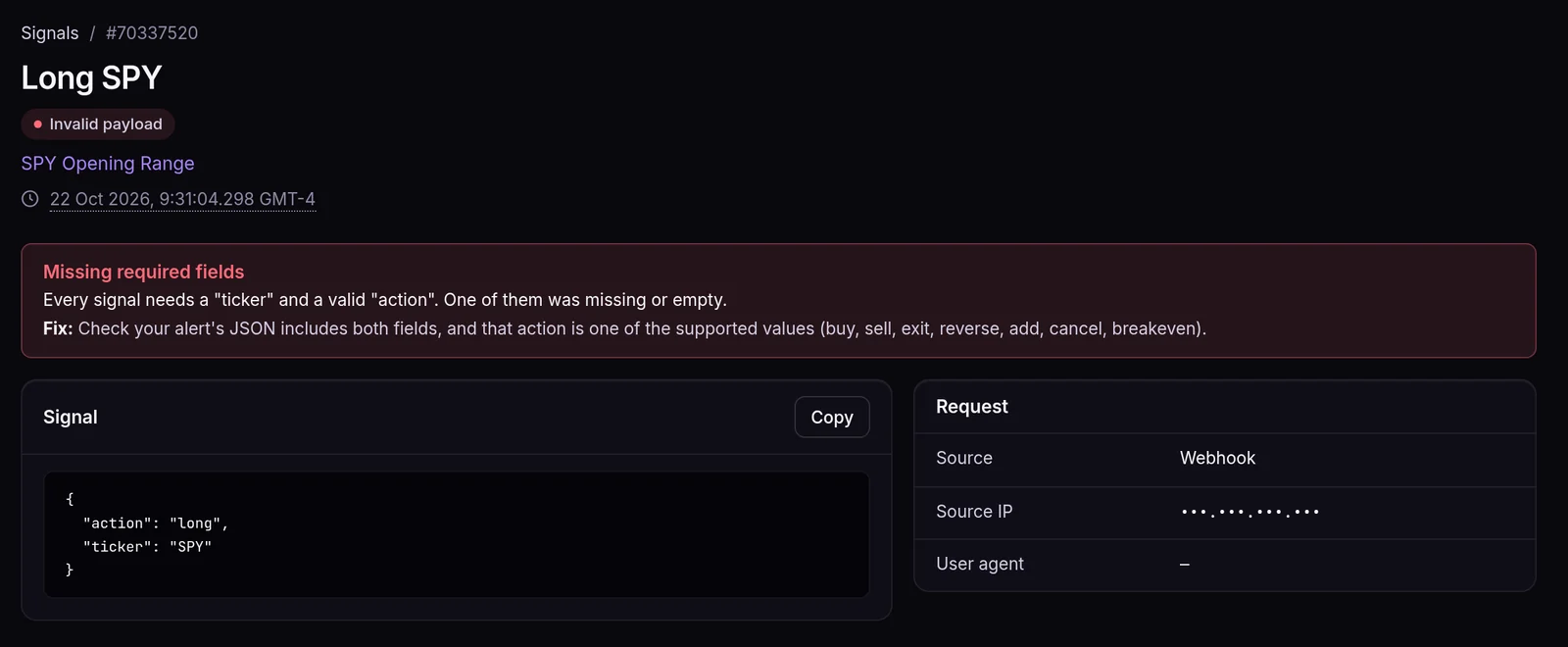
You'll see: Missing required fields. The webhook answers "The action field must be one of: buy, sell, exit, reverse, breakeven, cancel, add, resize.", and the same line is in the Detail column of the Signals list.
We sent {"ticker": "SPY", "action": "long"} a few milliseconds after the bad JSON above. long, short, close and flat aren't actions. They describe the position you want, and they belong in the sentiment field:
{"ticker": "{{ticker}}", "action": "sell", "sentiment": "flat"}
3. The ticker isn't allowed on the strategy
You'll see: Ticker not allowed on this strategy. The webhook answers "The provided ticker symbol is not allowed on this strategy."
The strategy is set to Only selected tickers and this one isn't on the list. On an options strategy, the list holds underlyings (SPY), not contracts.
Fix: add the ticker to the strategy's Allowed tickers, or choose Any tickers.
4. Wrong or retyped webhook URL
You'll see: Incorrect webhook secret on the Signals page. The webhook itself answers "Incorrect webhook password." If the first part of the URL is wrong too, it answers "Webhook not found." and nothing is logged, because we can't tell which strategy it was meant for.
The secret is part of the URL, and one wrong character is enough. If you rotated the URL, every alert still pointing at the old one is refused.
Fix: copy the URL again from the strategy's Webhook panel. Don't type it by hand.
Valid signal, skipped by the subscription
Here the signal itself was fine, but a subscription skipped it. The signal shows as Skipped, with the reason in the red box and on the Skipped step of its Execution timeline.
5. It's waiting for you (Manual Submit)
New subscriptions start on Manual Submit, so every order waits in Approvals, with a count on the sidebar. This is the most common "nothing happened" of all.
Fix: approve it, or switch the subscription to Auto Submit once you trust it.
6. You already hold that side
You'll see: Already holds this side.
On the demo account, BTC Swing bought 0.024483 BTC at 8:48 a.m. ET. At 9:15:24 a second buy for BTC/USD arrived. It was skipped in 62 ms, because Allow add to position is off, which is the default. That protects you from an alert that fires twice and doubles your size.
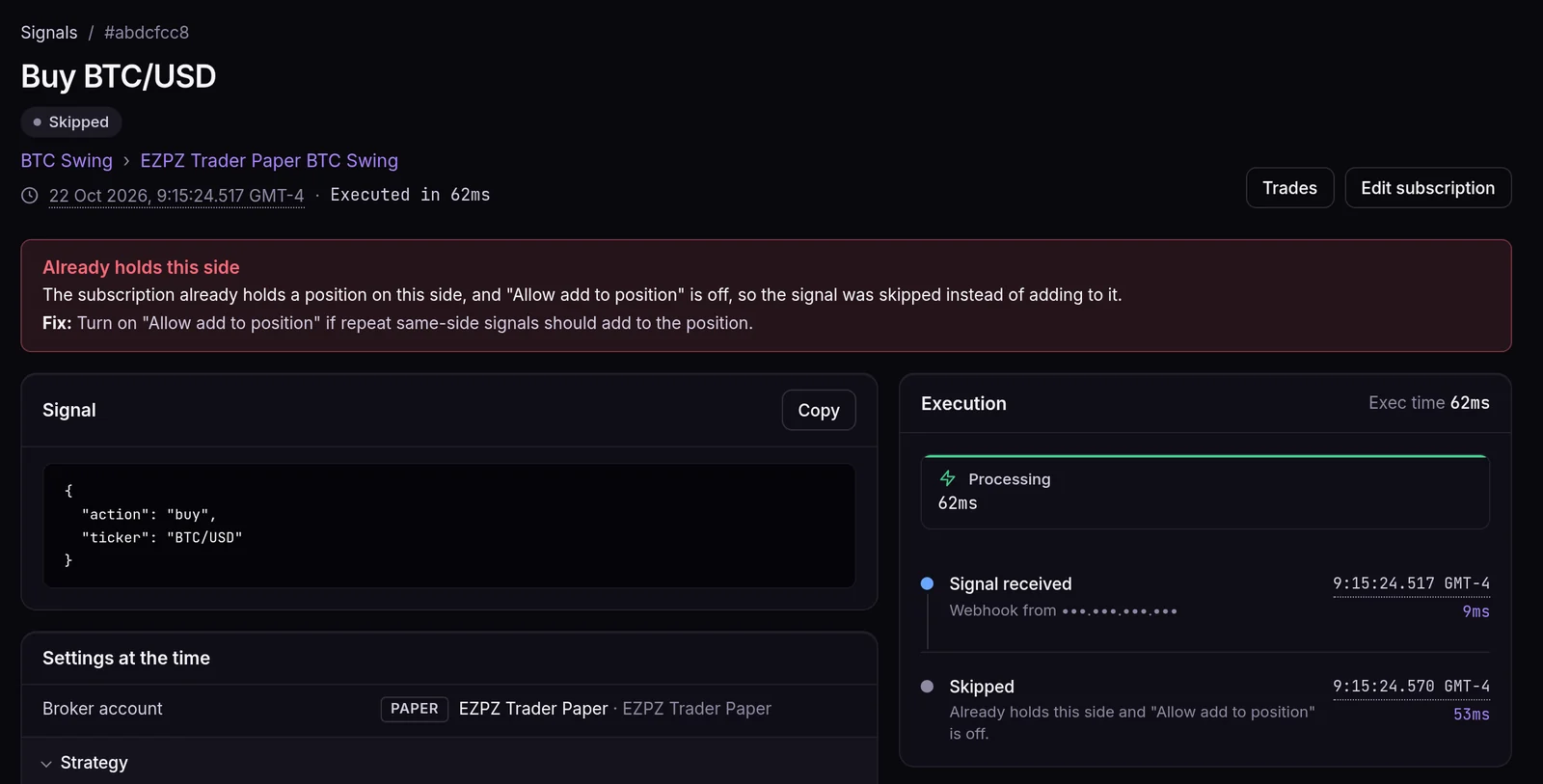
Fix: turn on Allow add to position, or send "action": "add" when you mean to add. add works without that setting, but only when there is already a position to add to.
7. Outside the trading window, or too old
You'll see: Outside trading window or Signal too old.
A trading window limits the hours a subscription trades. A signal age limit skips signals older than a set number of seconds, counted from the alert's own time if it sends one, else from when it arrived. Both are optional, and both are easy to forget once set.
Fix: check the subscription's trading windows and its age limit. If you want exits to work outside the window, turn on Allow exits outside trading window.
8. The size rounds to zero
You'll see: Quantity rounds to zero.
With fractional quantity off (the default), a Dollar amount or Percent of equity size is rounded down to whole shares, never up into a bigger trade than you asked for. On the demo account, QQQ Trend Follow trades $5,000 per signal. At 9:34 a.m. QQQ filled at $714.37: $5,000 ÷ $714.37 = 6.99, so it bought 6 shares, not 7. The same rule turns any amount smaller than one share into 0. With SPY at $766.72, a $500 amount would be 0.65 shares, rounded down to 0, and the trade is skipped.
(Fixed quantity is the exception: a fixed size that works out below 1 is raised to 1.)
Fix: raise the amount, or turn on fractional quantity on a broker that supports it.
9. The order doesn't fit the asset or the broker
The signal reached the subscription, but the order it asked for can't be placed there. Three versions of this:
- Wrong asset type. Wrong asset type for this subscription: an options contract (like
SPY260925C00650000) sent to a Stocks subscription, or a ticker that isn't a pair likeBTC/USDsent to a Crypto subscription. A plain ticker on an Options subscription is fine: the contract is picked for you on brokers that support it. - Shorting crypto. Crypto can't be shorted. We sent
"action": "sell", "sentiment": "short"for BTC/USD to BTC Swing at 9:24:51 a.m., a few seconds after the position was closed. That sell would have opened a short, and the crypto brokers we connect to trade spot crypto only, so nothing was sent. - Take profit or stop loss on a broker that can't attach them. Broker doesn't support bracket orders. At 9:32:30 a.m. we sent a SPY buy with
"takeProfit": {"percent": 1}to the paper account, which doesn't support take profit or stop loss. The buy was skipped rather than placed without its exit.
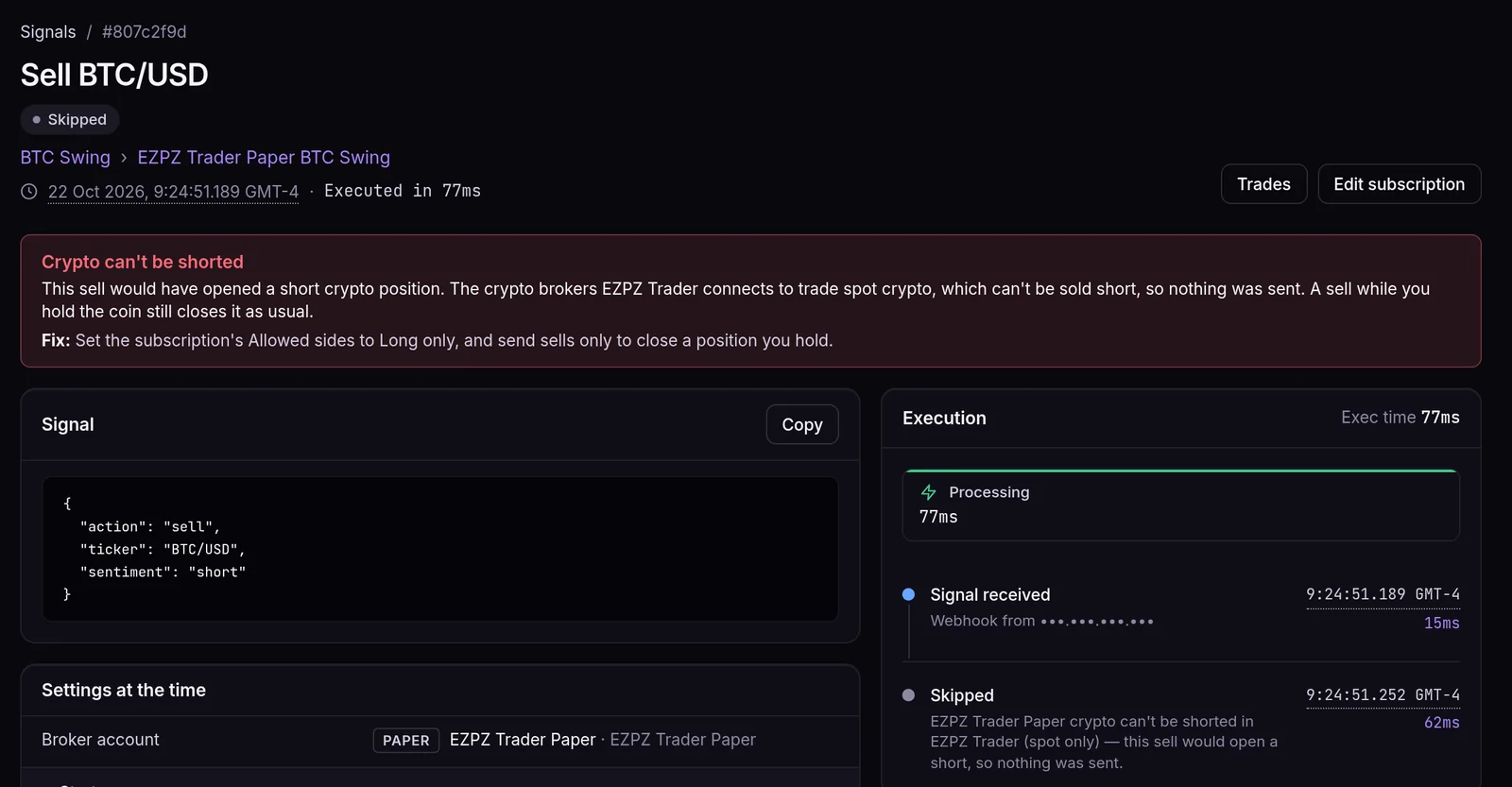
Fix: send stock tickers to a Stocks subscription and contracts to an Options subscription (see the options guide). On crypto, set Allowed sides to Long only and send sells only to close a coin you hold. For take profit and stop loss, use a broker account that supports them, or remove takeProfit/stopLoss from the alert.
Two things that aren't mistakes
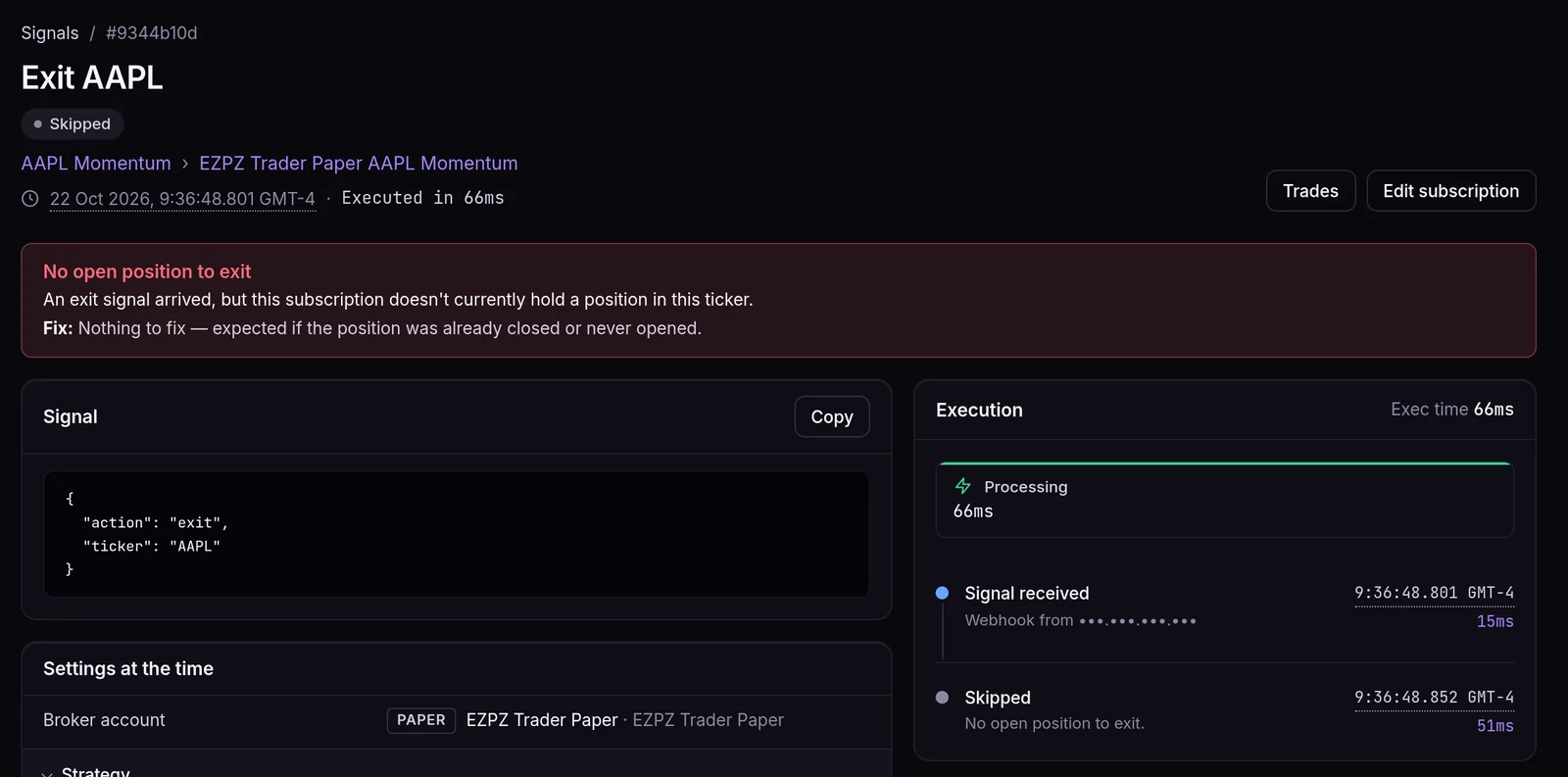
- No open position to exit. An
exitarrived and there was nothing to close. That's expected when a stop or an earlier exit already took you out. On the demo account, AAPL Momentum exited its 14 shares at 9:35:51 a.m. A secondexitat 9:36:48 was skipped with No open position to exit. - Duplicate signal. An identical signal (same strategy, ticker, action and payload) arrived again within 5 seconds. It's logged but not traded twice. At 9:31:03 a.m. a SPY buy filled 10 shares at $766.72. The same buy sent again 1 second later was logged as Duplicate signal and nothing more was bought. This is usually a retried delivery, and it's protecting you.
Frequently asked questions
Where do I see why a signal was skipped?
On the Signals page, open the signal. A refused or skipped signal has a red box with a title, an explanation and a fix, and the Execution timeline shows the step where it stopped.
Does a refused signal get retried?
No. A refused or skipped signal isn't re-sent by us, because re-sending could double an order. Fix the cause and let the next alert fire.
How many alerts can one strategy receive?
Up to 60 requests in 60 seconds and 500 in an hour per strategy. Above that, requests are refused with HTTP 429 before the body is read.
Can I send several signals in one request?
Yes, as a JSON list of up to five signal objects, if Allow batch signals is on for the strategy. Every signal in the list is checked first: if one is invalid, the whole request is refused and none of them is traded.